
EXCLUSIVELY AT CENTURY 21 EDGE
ONE PLATFORM.
ONE LOGIN.
Most brokerages hand you a login to somebody else's software and a list of subscriptions to go buy. We built our own. edgeONE is your CRM, your website, your phone line, your marketing studio, your transaction desk, and your AI assistant that CENTURY 21 Edge designed, built, and supports ourselves, and every agent gets all of it the day they join. No tiers. No add-ons. No monthly bill.
Why we built it
TECHNOLOGY SHOULD
WORK FOR YOU
It should fill itself in, remind you before you forget, and hand you the next thing to do. Off-the-shelf platforms make you fit their idea of a brokerage and charge you for every piece. Ours is written for the way CENTURY 21 Edge agents actually work, by people who sit in our offices, and when an agent asks for something it gets built. One platform that keeps you in front of the right people, closes more of what you start, and gives you your evenings back.
Your day, already planned
AI POWERED DASHBOARD
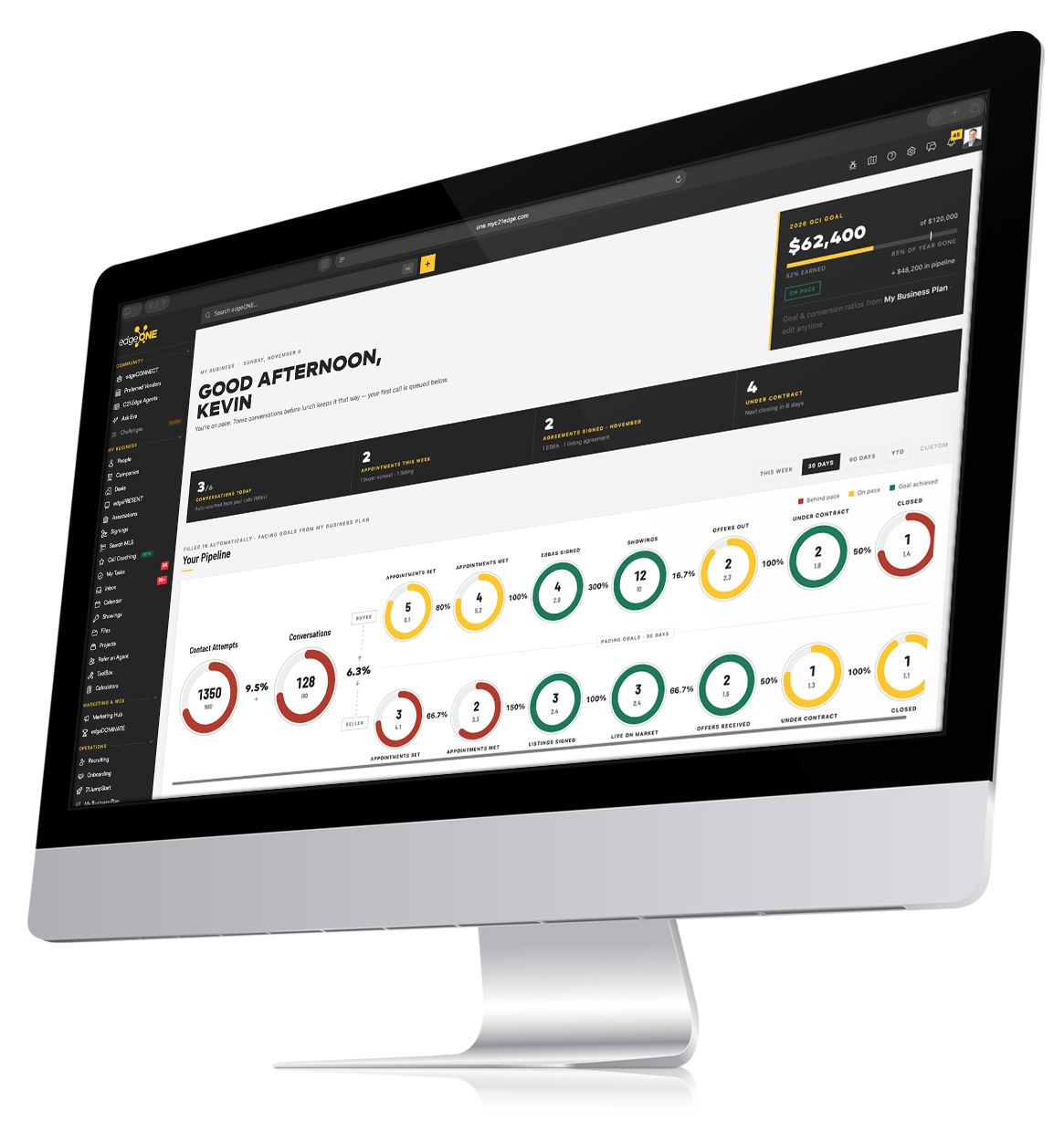
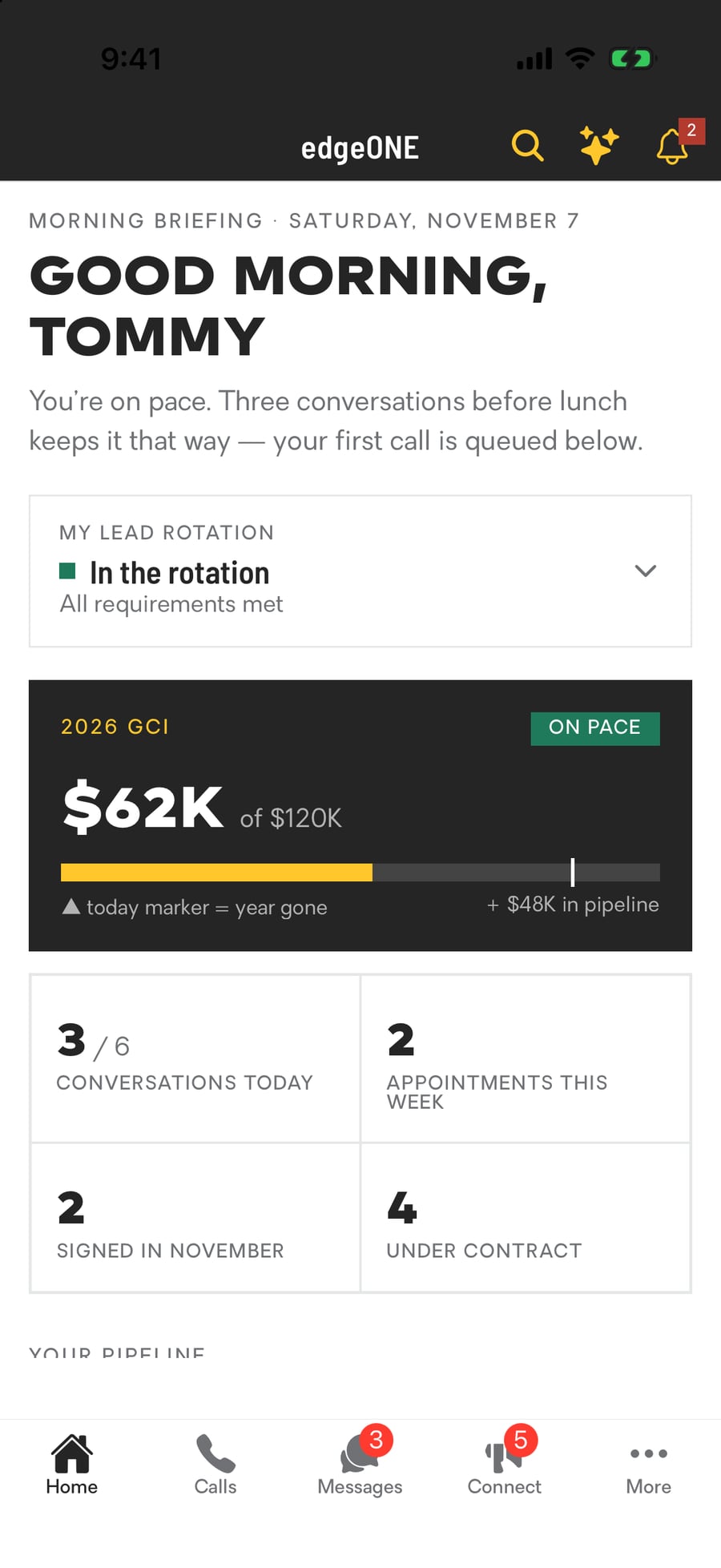
Open edgeONE and your whole year is on one screen: your income goal, how far along you are, and dials that show exactly where your pipeline stands against it. Every number fills itself in from your calls, texts, appointments and signed agreements. You never log a thing.
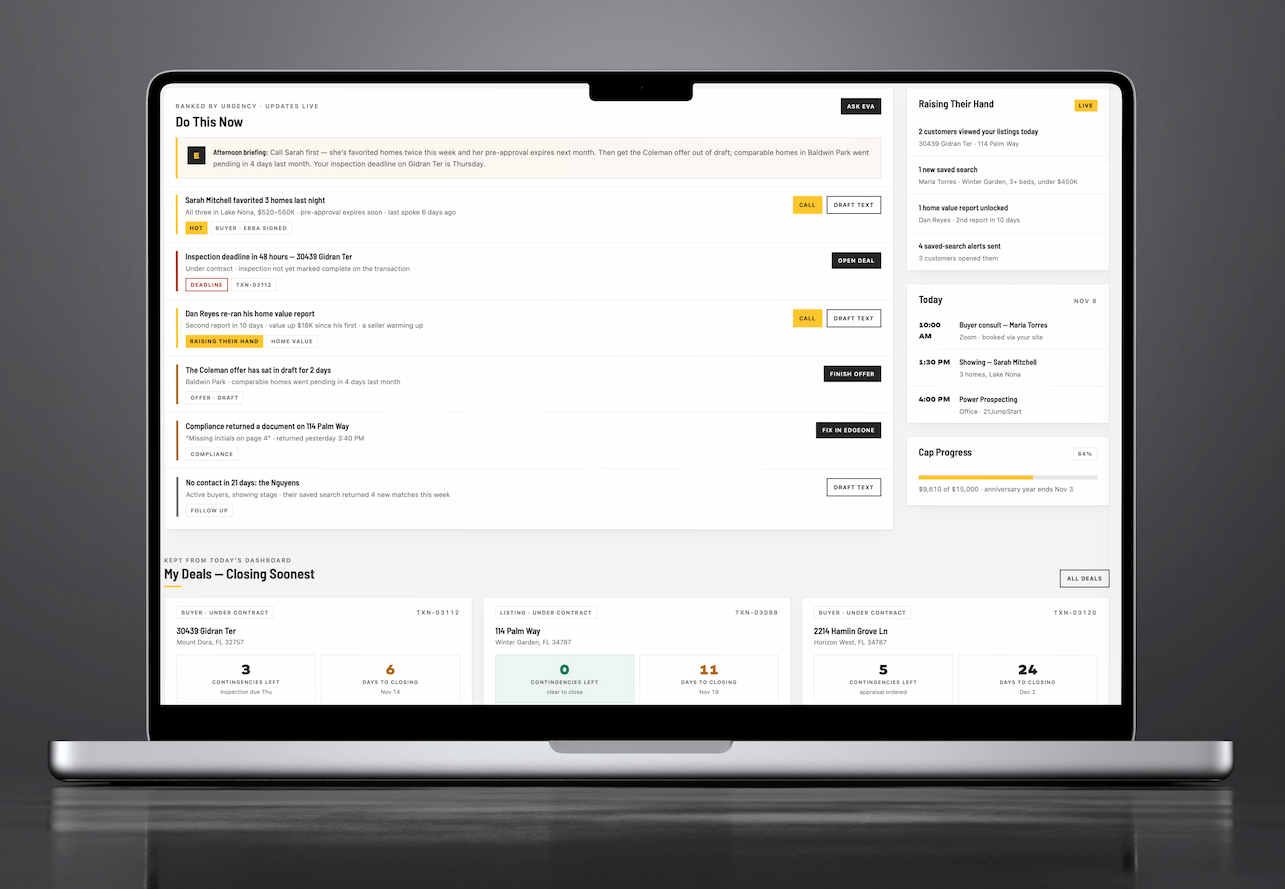
Underneath, ranked by urgency, is your call list for today: who to call, why now, and a text already drafted. Nobody who raised their hand on your website or your listings slips past you.
Contact attempts and conversations counted from your calls automatically
Buyer and seller tracks paced against your own business plan
"Raising their hand": who viewed your listings and saved a search today


Your assistant, not a chatbot
MEET EVA
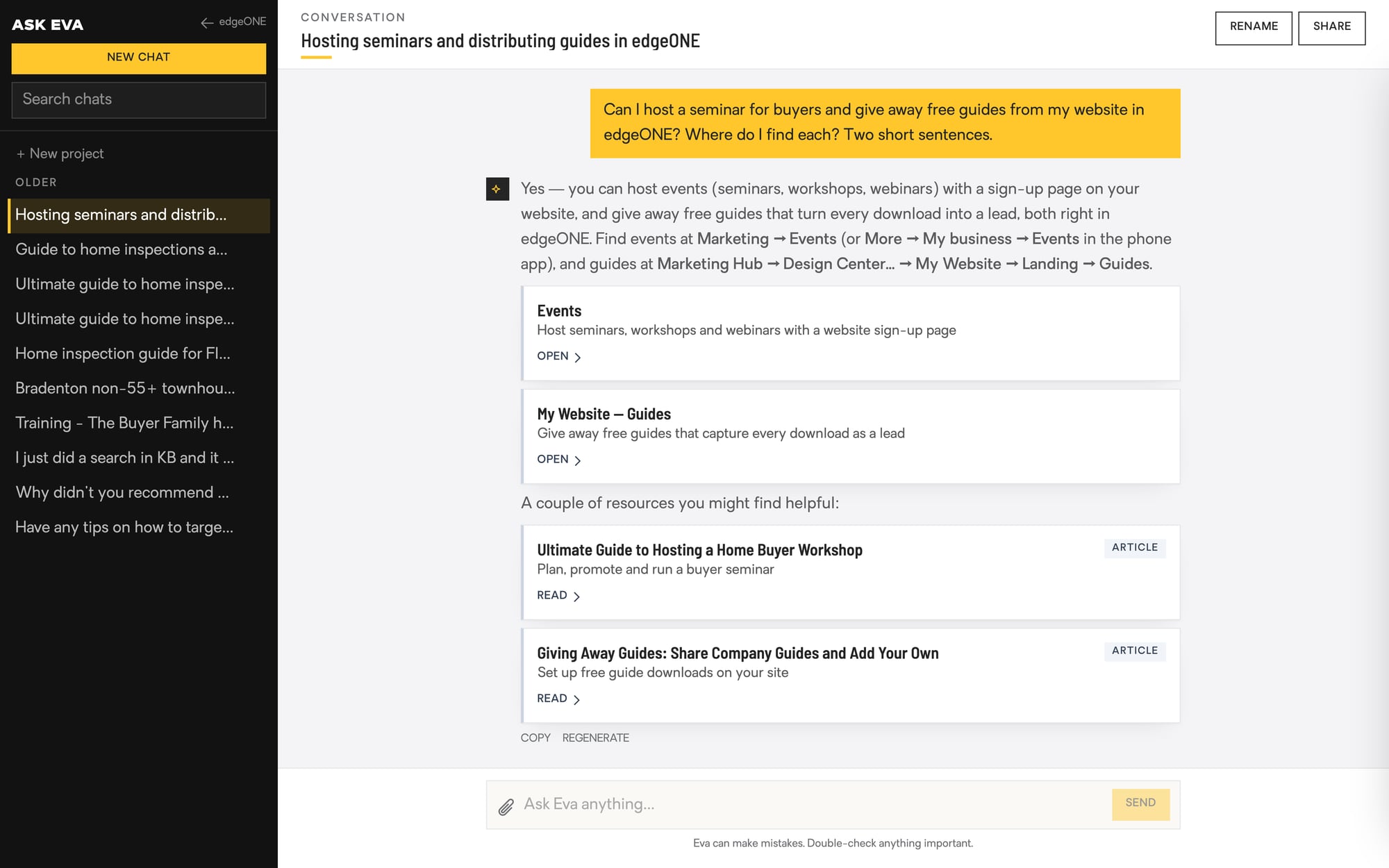
Eva knows your business. Ask her who has gone quiet, which buyer favorited three homes last night, what a deal pays you, or how long a listing has been on the market, and she answers from your real data. Ask her to write the Facebook post for your new listing and she checks every claim against the MLS before she writes it.
She sets your reminders, opens the right page, finds the how-to, and after every call she tells you what worked and what to say next time. On your desk and in your pocket.
Knows your people, deals, listings and calendar
Writes posts, bios and emails that are actually accurate
Scores your calls and coaches you after each one
Contract to close, done for you
DEALS + SIGNINGS
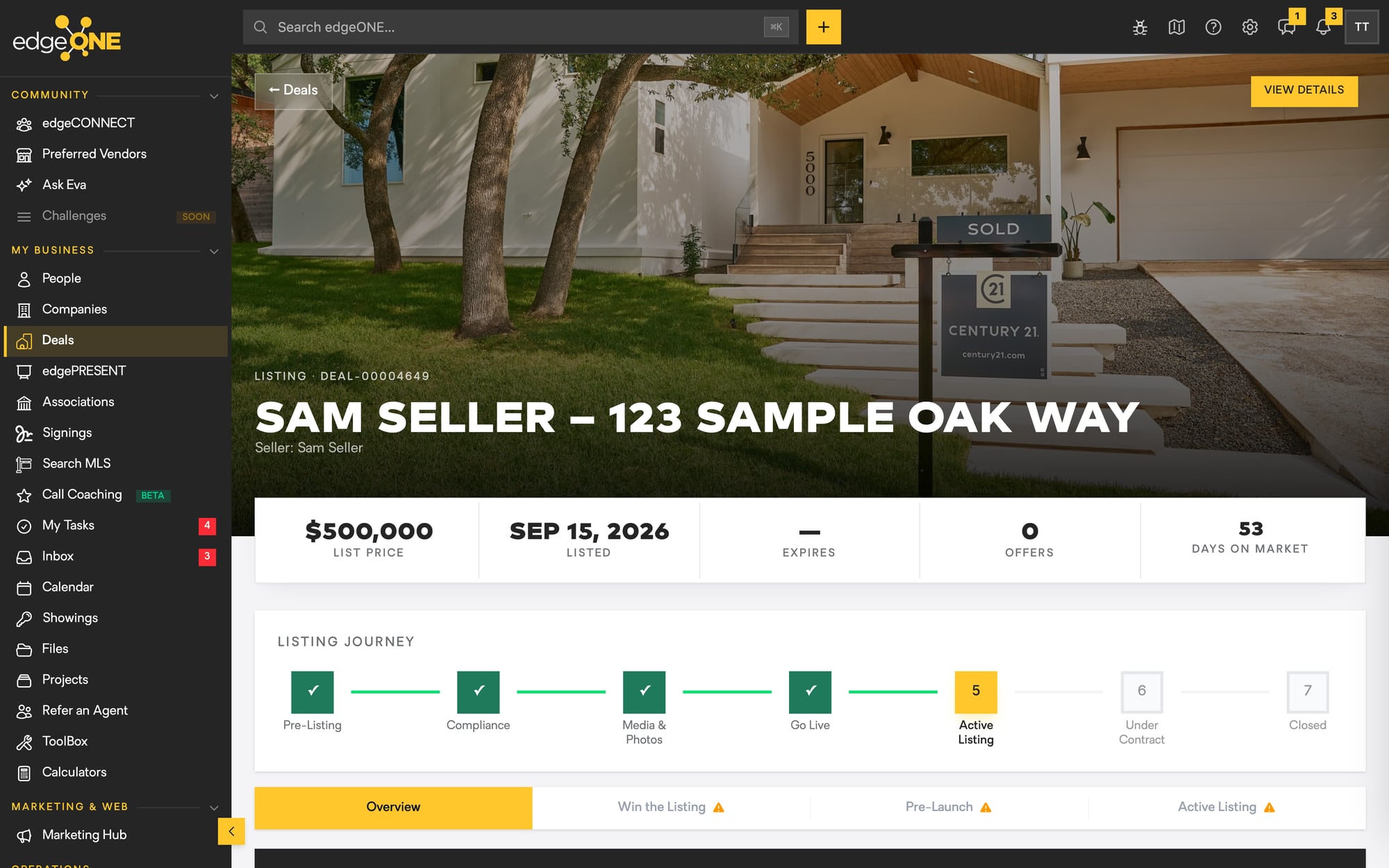
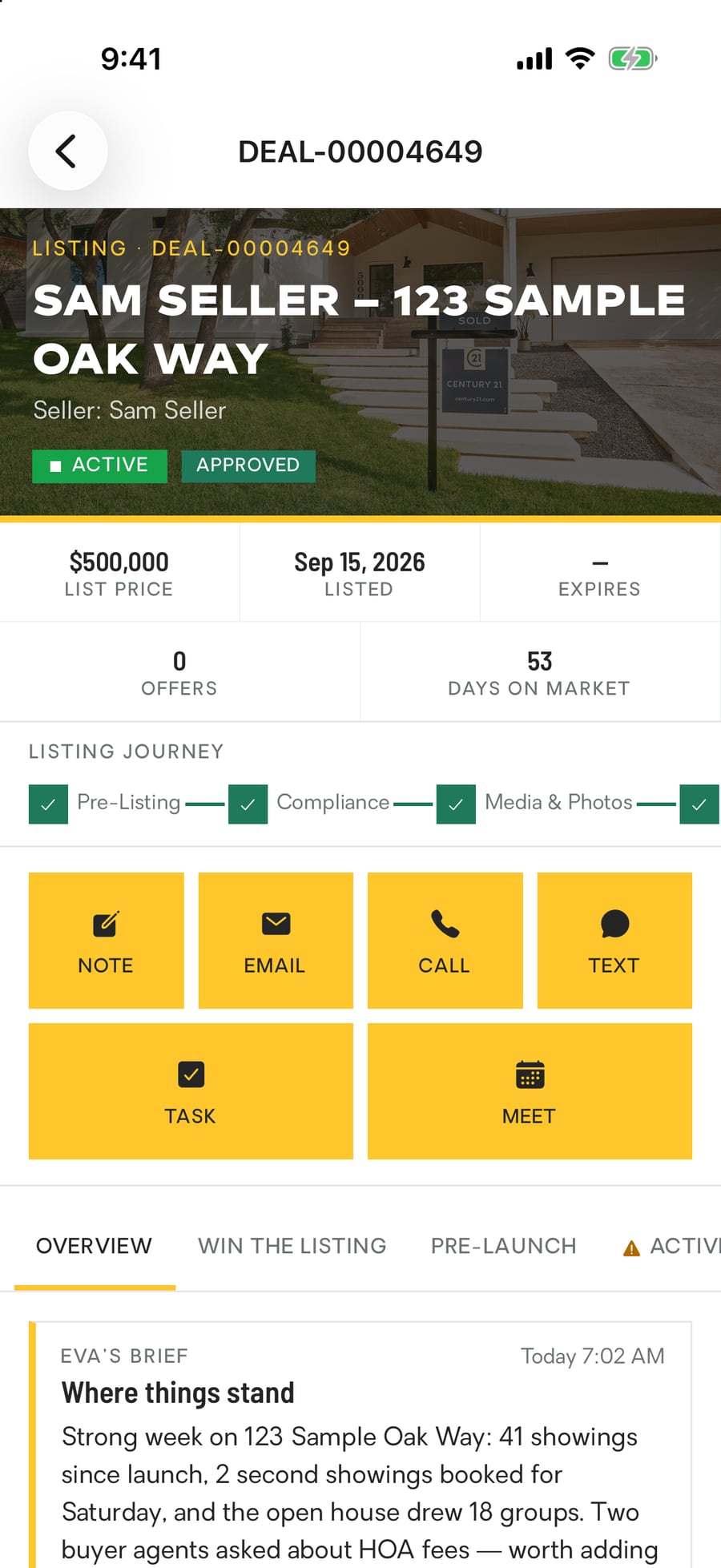
Start a deal and edgeONE builds the file for you: the home, the people, the price, the photos, the deadlines. Pick the agreement, and it is filled in from the deal and sent for e-signature with one click. When it comes back signed, it files itself, the dates land on your calendar, and the compliance checklist ticks itself off.
You see the whole journey, from pre-listing to closed, on one screen, and the only thing you type is what you want to say to your customer.
E-signature built in, with a full audit trail and no per-envelope fee
Residential, commercial, land and business deals
Outside agents send offers through your listing’s link
Win the listing
edgePRESENT
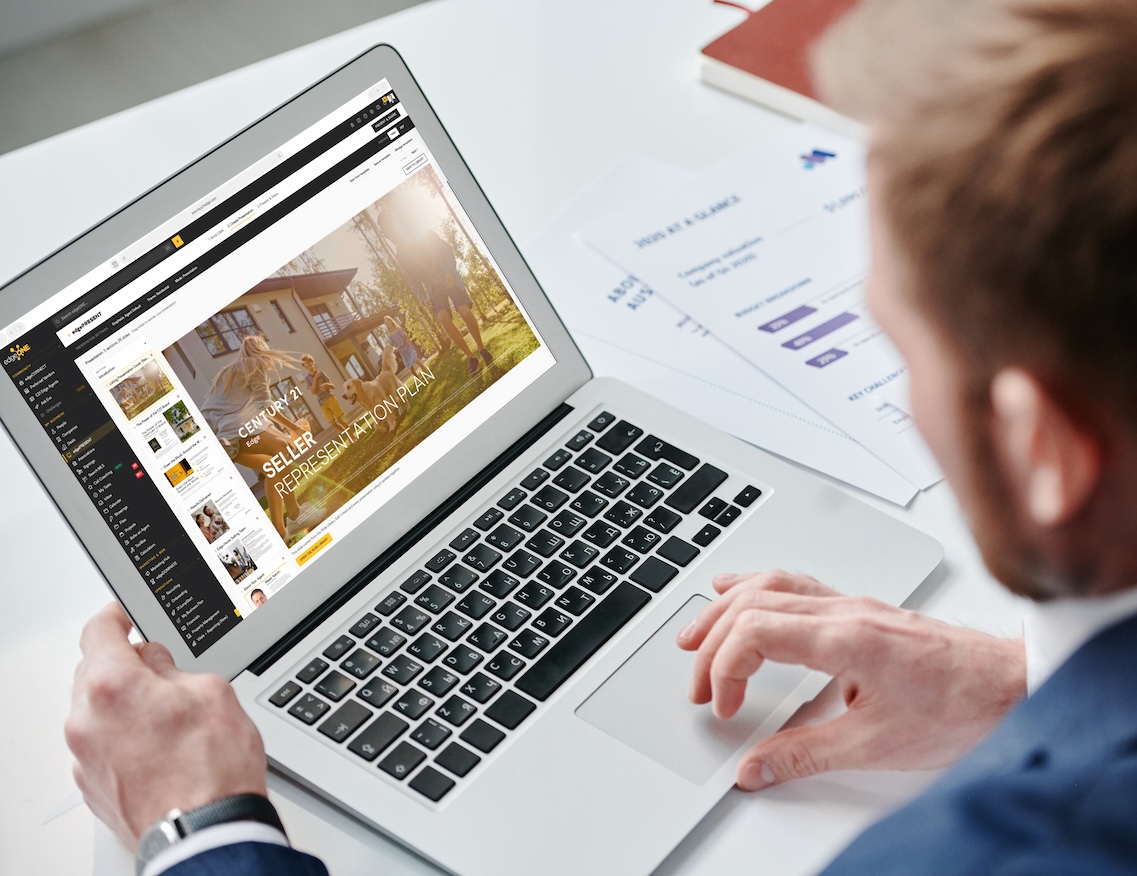
Walk into every listing appointment with a presentation that looks like it took a designer a week and took you four minutes. edgePRESENT pulls the comps, the market stats and the seller's home from our MLS data, drops them into a library of designed slides with your name and photo on every one, and gives you a link the seller can open at the kitchen table.
Buyer tours, price check-ups and listing presentations, all from the deal you already started, all refreshed with today's numbers before you walk in.
Pricing from what actually sold nearby, not a national formula
Present on a screen, send a link, or print it
The seller signs the listing agreement right from the presentation
The whole MLS, your way
SEARCH MLS
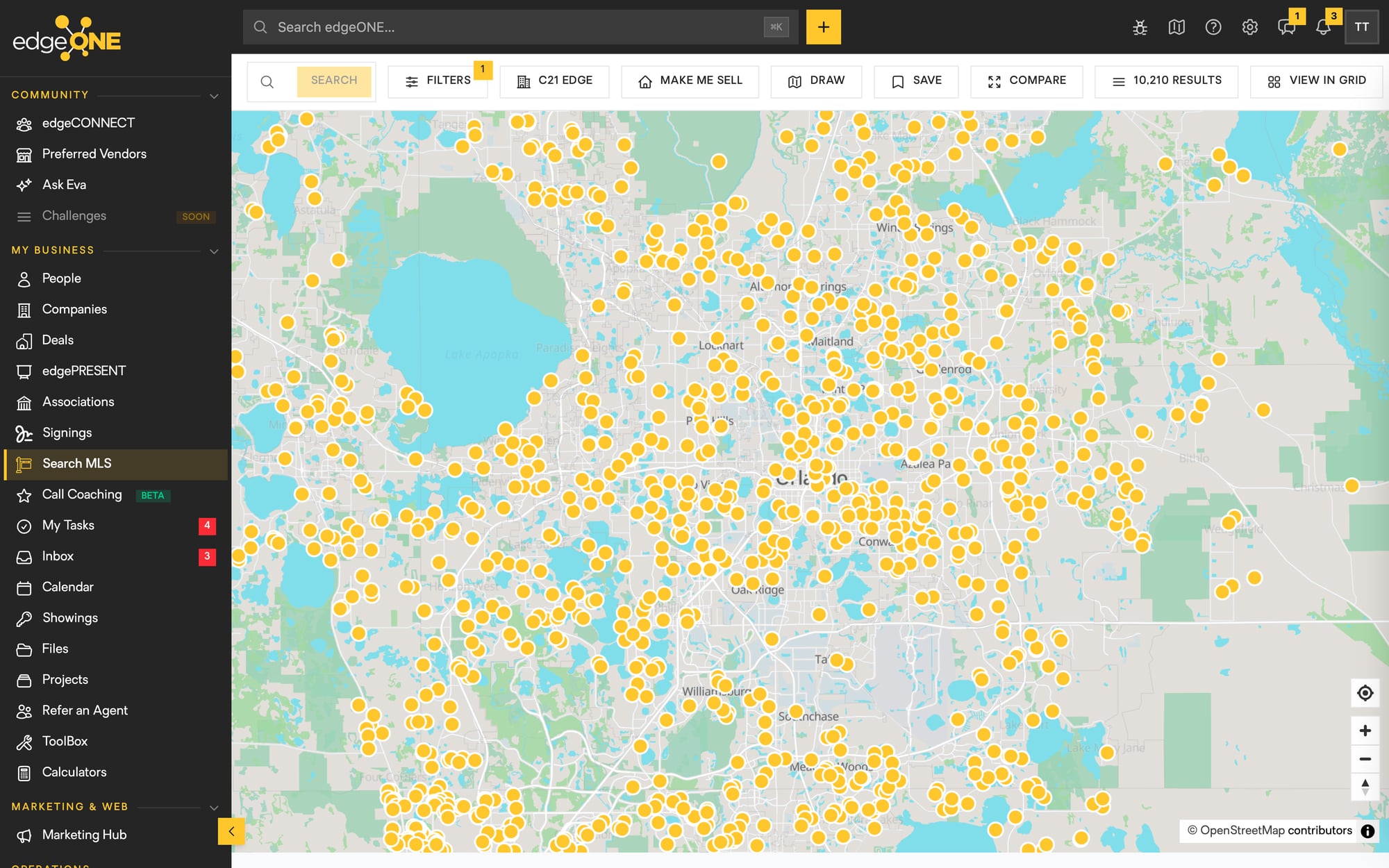
Every listing in the MLS on a live map, with the filters your customers actually ask for: draw an area, search by drive time, or just type "pool homes under 500 in Winter Garden" and let it figure out the rest. Compare homes side by side, save the search for your buyer, and the new-listing alerts go out from your website in your name.
Make Me Sell: find the owners most likely to list next
Every listing a home ever had, in one history
Our own listings get the C21 Edge badge so you see them first
Showcase your unique brand
YOUR WEBSITE +
CUSTOMER APP
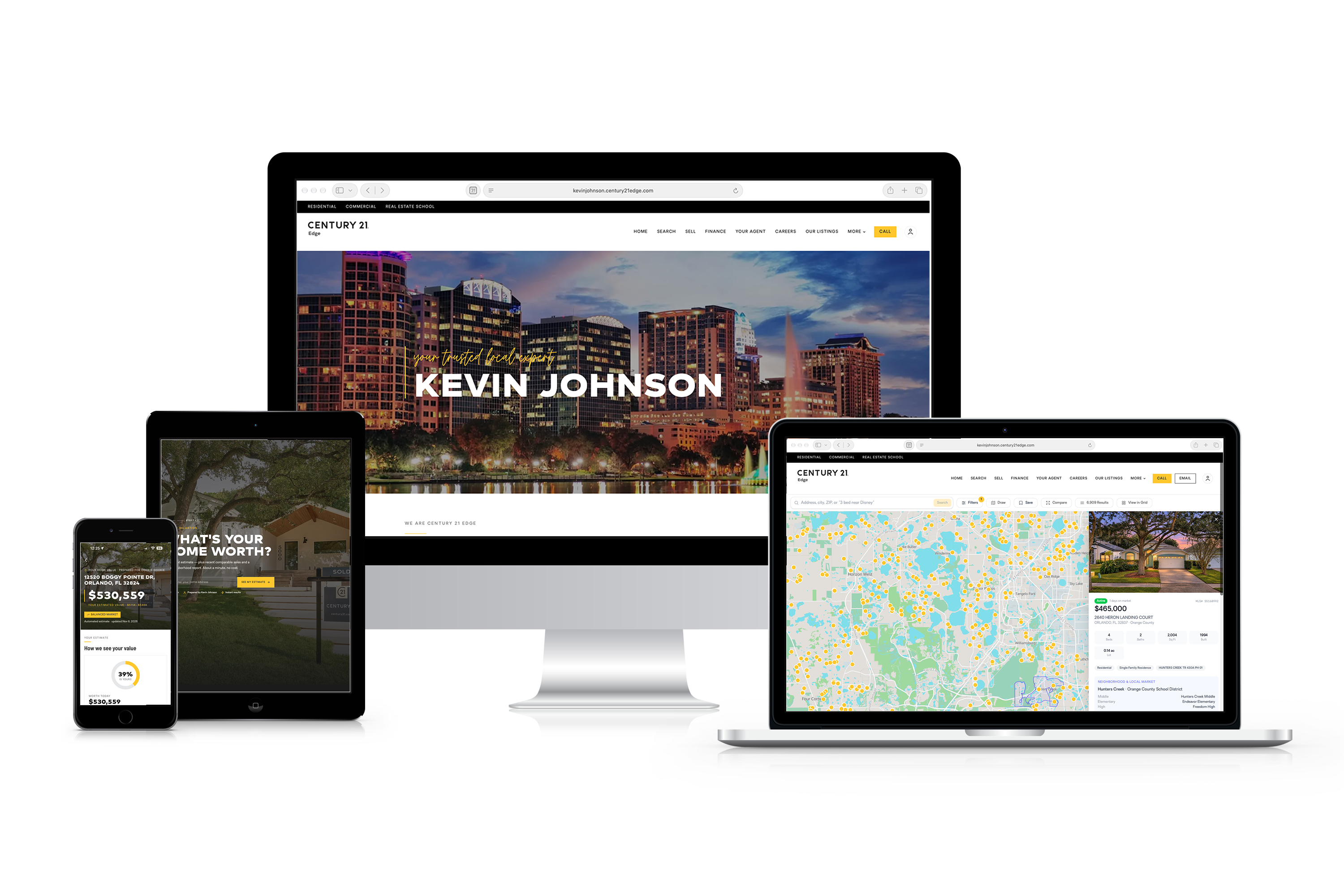
Your own site on century21edge.com is live the day you join, with a portal-quality home search, neighborhood pages for every town we serve, home value pages, open house registration and listing alerts. Every visitor who signs up lands in your database, and you can see which homes they viewed, how long they looked and when they came back.
Your customers download the CENTURY 21 Edge app, and you stay in it with them: a live value on the home they own, a search that learns what they want, and you one tap away.
No monthly website fee, no separate login, no developer
Edit any page yourself, or let us build it
Leads from your site go to you, never to a portal
Goodbye to the subscriptions
MARKETING HUB
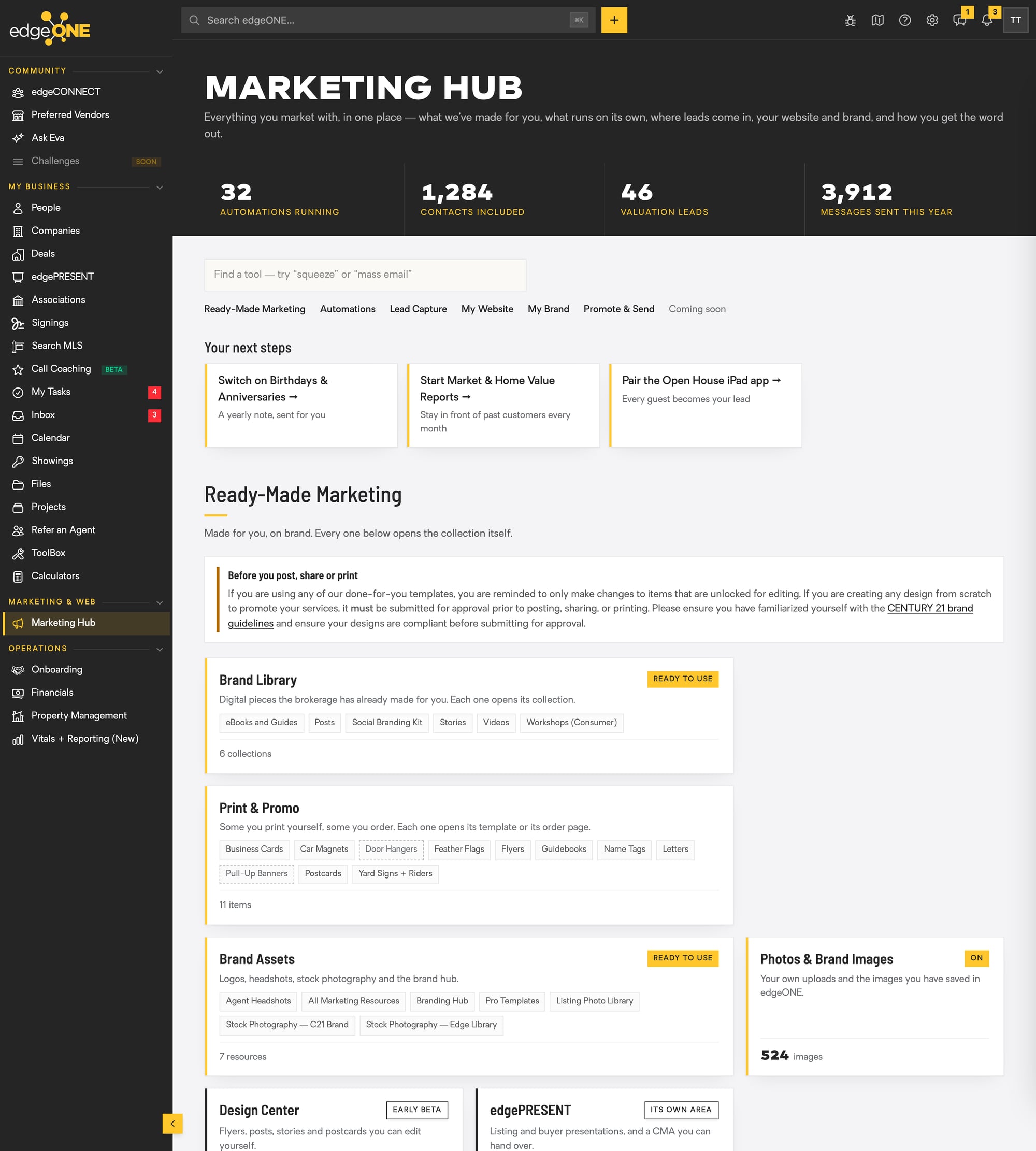
Everything you market with, in one place, and most of it runs without you. Birthday and anniversary notes go out on their own. Monthly market reports go to every past customer who wants one. Journeys follow up by email and text based on what people actually do. Your eNewsletter tells you exactly who clicked.
When you want to make something, the Design Center has your brand, your headshot and your listings built in, and edgeAI writes the bio, the blog post and the listing copy for you.
Ready-made brand pieces, print and signage ordering
Landing pages, short links and QR codes that trace every lead back to a person
The Open House iPad app turns every guest into a lead
Any place, any device
THE REAL THING,
ON YOUR PHONE
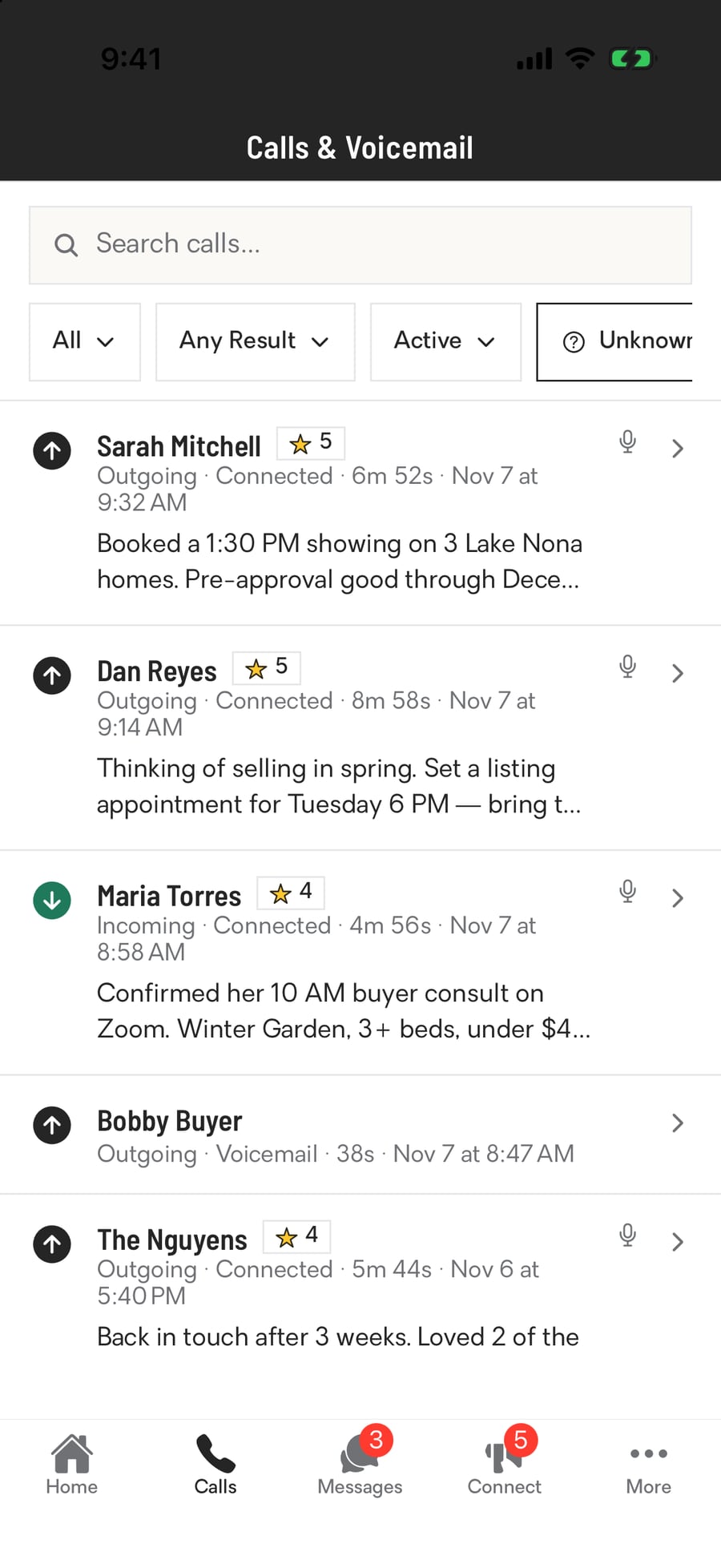
Not a stripped-down companion app. Your people, deals, listings, calls, texts, calculators and training are all in the edgeONE app, Eva included, and a new lead buzzes your pocket the moment it comes in. Your customers use the same app to search, save homes and reach you with one tap.
BUILT-IN TOOLS
EVERYTHING INCLUDED
One login. No monthly platform fee. Every tool below is yours the day you affiliate. Click on each tile to learn more about the feature.
Showing 40 of 40
An assistant who knows your business
Eva (Edge Virtual Assistant) is edgeONE's AI assistant, and she works from your real business. She knows your people, your deals, your listings and your calendar, so you never have to explain who Sarah is or which house you mean. Ask in plain words, on the website or in the phone app.
The first time you open her each day, she lays out your day: tasks due, customers waiting on a text back, people looking at homes again, today's appointments and this week's deadlines. Tell her how a call went and she puts the note, the follow-up and the saved search on one card. Nothing is sent or saved until you tap the button.
- Brief me on a customer before I call
- Text a customer from your Business Line in one tap
- Write a listing post or email from the real listing details
- Set reminders, saved searches, appointments and Buyer Tours
- Call coaching, plus what raises your Vital Score fastest
Condo and HOA docs, already gathered
Associations gives every condo, co-op and homeowners association we track its own record. The documents are sorted into a checklist, like the bylaws, the declaration, the budget, the master insurance policy and the milestone inspection report, so you can hand a buyer or seller what they need without chasing anyone.
Each record also shows how the association is managed and the homes for sale and sold in that community, straight from the MLS. Our leadership team keeps the records current. You just open one and download what you need.
- Document checklists for condo, co-op and HOA records
- For Sale and Sold listings in the community
- Linked property records
- Ask Eva which documents are on file
- Also in the phone app
Let customers book you themselves
Every agent gets a booking page already set up with Listing Presentation, Buyer Consultation, Quick Chat and Showing. Publish it, share one link, and customers pick a time that is really open, because edgeONE checks your Google Calendar before it offers a slot.
The moment someone books, it lands on your calendar and they get a confirmation by email, text or both. A new customer is added to your People as your lead, with their consent on file. They can cancel or reschedule from their own link, and the reminders you set go out on their own.
- Set your hours, buffers, notice time and daily limit
- Zoom or Google Meet links created for you
- Ask your own questions on the booking form
- Buyers can book a showing from our listing pages
- Run it all from the website or the phone app
Your business number, working for you
Every agent gets their own edgeONE Business Line. Customers see that number on your website, your email signature and your texts, so your personal cell stays private. Calls to it ring the edgeONE app with the caller's name on screen.
Every call logs itself on the customer's record and counts on your dashboard, so there is nothing to type. Calls are recorded, transcribed and summarized for you. Miss one and the caller reaches your voicemail, and the summary of their message pops up on your phone.
- Call from the app, or from the website and it rings your cell first
- Pick your voicemail greeting: record it, type it, or use the company's
- Callers we don't know wait in one list to call back or add
- Every number is checked against do-not-call lists first
Run the numbers. Capture the lead.
Pick a seller's home and the Seller Net Sheet fills itself in: county record, tax bill, a loan payoff estimate and Florida closing costs, with every figure showing where it came from. Compare offers, try other prices and print a PDF. In Farm Area, draw a neighborhood to see its turnover, who is winning the listings and the owners' mailing list.
Your website carries seven of them for customers: mortgage, affordability, rent vs. buy, refinance, flip, short-term rental and rental investment. A customer who wants their results emailed, homes in their budget or the full investor report gives their name, email and mobile and becomes your lead, with their numbers on their record.
- Share any calculator with your numbers filled in, by link, text or QR
- Rate buydown and points, with the break-even worked out
- Investment, flip and short-term rental reports look up the property
- All of them in the phone app too
Your whole day, one calendar
Your Google Calendar, your edgeONE appointments, customer bookings, company training and tasks with due dates all land on one calendar automatically. Nothing to copy over, nothing to keep in sync by hand.
Click an empty half hour to add an appointment. It goes onto your Google Calendar too, with a Zoom or Google Meet link when you want one. Click any appointment to mark it Completed or No-Show, and completed ones count on your dashboard and in 21JumpStart for you.
- Month, Week and Agenda views, on the website and in the phone app
- Events you made in Google can become edgeONE appointments
- Company holidays show, and your booking page offers no times that day
- One click to My Scheduler, your personal booking page
Your own call coach, built in
Business calls on your Business Line that run 90 seconds or more are reviewed by Eva within minutes. Most get stars on six skills, then up to three things you did well and three to improve, each tied to the moment in the call you can tap to hear.
The first fix says Start here, with the exact words to try next time. Eva also checks what you told the customer against your own listings and sales and our policy manual, and shows whether you asked for the appointment and got it on your calendar.
- A push after each call and an 8 AM recap email on weekdays
- Pick any date range to see how you're trending
- A leaderboard with the top 10 and your place
- Call List calls are coached too
Work purchased lists, fast
Upload the FSBO or Expired list you bought, as a spreadsheet or CSV, and match its columns in a few clicks. Start a calling session: edgeONE rings your cell once, you answer and stay on, and each Call rings the next number straight through from your Business Line.
Each card shows why you're calling, with the home's MLS history and our value estimate. Voicemail picks up? One tap drops your recorded message and you move on. Every dial counts as a contact attempt, and calls are recorded so Eva can coach them.
- Do-not-call numbers are flagged and can't be dialed
- Mark Talked, Call back, Not interested or Wrong person
- Make a contact once you have name, email and mobile
- Works on the website and in the phone app
Competition that keeps its own score
Coming soon. Challenges are friendly competitions run by the brokerage and your office, and edgeONE does all the scoring. Points come from the work it already counts: calls, real conversations, appointments, signed agreements, offers, contracts and closings. You never log a thing.
Standings refresh every 15 minutes on a live leaderboard, so you always know where you stand. Bonus rounds, teams and tiers keep it fair, and some challenges score you against your own plan, so a newer agent can beat a top producer.
- Counted by the same rules as your dashboard
- Live standings on the website and in the phone app
- Bonus rounds built from your own contact list
- Prizes, winners and a trophy case for your wins
Your whole closing to-do list
The Closing Desk pulls what your open deals and transactions need into one list: contract deadlines, missing documents, signatures still out and tasks. It sorts them into Overdue, Today, Tomorrow, This week and Next week, so you always know what comes next.
Each line has its own buttons. Mark a deadline or task done, upload the missing document right there, or snooze it. My Compliance shows every document on your files and where it stands: needs revision, ready to submit, pending upload or awaiting the reviewer. You also get an email and a bell reminder three days before each contract deadline, and again on the day.
- Deadlines come straight from your contract dates
- Returned documents show the reviewer's note
- Tap a line to open the deal or transaction
- Both are in the phone app too
Start every day knowing what's next
Every morning at 7 AM your Daily Digest email lays out the day: what to do now, customers active on your website this past week, yesterday's new leads, compliance documents still open, and new articles to read. To-dos clear on their own once the work is done.
During the day, edgeONE taps you on the shoulder when it counts. A customer texts back or a new lead comes in, and your phone buzzes and your bell lights up. Miss a call and the voicemail's summary pops up on your phone.
- Open the full digest on the website or in the phone app
- See yesterday's website visitors, leads, saved searches and favorites
- Mark items read as you go, or show only To do
- Ask Eva to plan your day, with one-tap Text and Call
The deal file that fills itself in
Listing, buyer, lease, referral, commercial, land and business deals all live here, and the deal file fills itself in. Pick the home and edgeONE pulls in public records, the MLS listing and photos. The MLS data entry sheet starts with the property facts and your details already in, and contract deadlines count themselves from the contract dates.
Offers work the same way. The contract reads every answer from the offer, so you never fill out a form twice. Accept an offer and the transaction is built with the terms carried over, the right checklist attaches on its own, and Eva sums up where the file stands.
- Buyer deals move to the next stage on their own
- A seller net sheet that fills itself from county records
- Agents who sold nearby get a personal email from you when you go active
- Outside agents send offers through your listing's link
- Your deals in the phone app too
Design it yourself, on brand
Make your own flyers, social posts and stories without leaving edgeONE. Pick a size, like an Instagram post, a story or a letter-size flyer, then drag in your headshot, our brand colors and logos, and photos of our listings.
It works like the design tools you already know. Download the finished piece as an image or a PDF, ready to post or print. Design Center is open now as an early beta, on a computer.
- Social, story, flyer and presentation sizes
- Your headshot drops in as a circle with one click
- "Apply brand" sets brand fonts and colors on every page
- Remove a photo's background, up to five a day
- Download as PNG, JPG, PDF or SVG
Answer a few questions. Done.
edgeAI turns a few answers into finished marketing. The Agent Bio writer gives you a bio for your website, LinkedIn, Facebook, Instagram and X, and saves it to your profile. The Blog writer drafts an SEO-ready post and puts it on your own website's blog as a draft, ready for a photo and Publish.
Enter an MLS number in the Listing Marketing Studio and it reads the listing and its photos, then writes MLS remarks, social posts, an email campaign, QR flyer copy and an open house kit. Upload a photo of an empty room and Virtual Staging furnishes it in the style you pick.
- Unique Selling Proposition: a short, powerful line that sets you apart
- Customer Avatar: your ideal customer, with content ideas
- Ten staging styles, from Modern to Coastal
- Five writing tones, from Warm & Inviting to Luxury & Refined
Walk in ready to win the listing
Start Win the Listing from your seller's record and edgeONE builds the CMA for you. It picks the closest similar sales the way an appraiser would, explains every price adjustment in plain words, and lays it all out in designed slides: your photo and bio, the comps, the local market, how many of our buyers are searching near the home and your seller's net sheet.
Present it full screen at the kitchen table, print a PDF, or send a link by email or text. edgeONE tells you when your seller opens it and shows which slides they read. Working with buyers? Buyer Tours plan the route, line up the showings and let your buyers rate every home.
- Add, remove and adjust comps, every line explained
- Slide-by-slide tracking for each person you send it to
- Print-ready PDF with a page per comparable
- Tour Day screen on your phone for showing day
Host the event. edgeONE handles the rest.
Pick a template, like the First-Time Homebuyer Seminar, Seller Seminar or Online Webinar, and the page copy, agenda, sign-up questions and emails are already written. Eva can write the rest in our brand voice. Publish and your event gets its own page on your website, and it shows on your office's site and the company site too.
Everyone who signs up lands in edgeONE as your lead. They get a ticket with a QR code, reminder emails and texts from your Business Line, and a thank-you or missed-you email afterward. Each date goes on your calendar, with a Google Meet or Zoom link for online events.
- Six ready templates, or start blank
- Seats, guests, tickets and a waitlist handled for you
- Check people in at the door from your phone
- A report of views, sign-ups, check-ins and no-shows
Give a guide, get a lead
Five ready-made guides are already on your website: First Time Homebuyer Guide, Improve Your Credit, Home Mortgage Options, 5 Dangers of Overpricing Your Home and the For Sale by Owner Guide Book. Each company guide gets your own back page with your photo, Business Line, email and a QR code to your site.
A visitor gives their name, email and mobile, and the guide is emailed to them from you. They land in edgeONE as your lead, tagged with the guide's name, and you are told the first time they open it. Have a guide of your own? Upload the PDF and a cover, and it goes on your site.
- Every guide has its own page to share, with a link and QR code
- Visitors can search guides and pick who they are for
- Promote a guide with a Facebook and Instagram ad from edgeONE
- Already your customer? You hear when they download one
Email and texts, already filed
Your Gmail and your Business Line texts live side by side in one Inbox. Every email is saved to edgeONE and attached to the matching customer, company or deal on its own, so the whole conversation is on the record when you need it.
Open an email from someone new and edgeONE offers to add them to your People, filling in the form from their email signature. Write an email now and schedule it to send later from your Gmail.
- Mail and Texts tabs, on the website and in the phone app
- Snooze, mute and block senders in the app
- Saved Snippets in every email and text
- Emails to Spanish, Portuguese and Haitian Creole speakers can go out in their language
Follow-up that never forgets a customer
A journey starts the moment something happens: a new lead comes in, a tag is added, a customer views or saves a listing, a form is filled out, or a date on their record comes around. Then it runs step by step. It sends an email from you, waits two days, sends a text and puts a call on your task list.
Each step can check what the customer did. Did they open the email, click, or reply? The journey takes a different path for each answer.
- Ready-made company journeys, already running
- Switch a company journey off for just your leads
- Make your own copy of any journey and change it
- Texts wait for texting hours, 8 AM to 9 PM
- Pause or remove a customer from the phone app
Turn every sign and ad into leads
Pick what you want to promote: a set of homes, one listing, a home value, a market report, a calculator, a guide, an event or an area's new-listing alerts. edgeONE builds the page and hands you a short link and a QR code for your sign, flyer, ad or post.
Everyone who registers is tagged with the source and hashtags you chose, and new leads from your site come to you. Landing pages work the same way. Type an MLS number and a full property page builds itself.
- Choose how many homes they see before registering
- Hide the menu so the page does one job
- Draw your own search area on the map
- See views and leads for every page
The one link your profiles need
Link in Bio gives you one simple page for your Instagram, Facebook or TikTok profile, at your own c21edge.link address. It builds itself from your profile: Book an Appointment, Visit My Website, Call Me on your Business Line and Email Me are there from day one, with your social icons and a Save Contact button.
Add your own buttons, pick light or dark, and watch what happens: page views, the buttons people tap and how many saved your contact. In the phone app, Share My Card turns the page into a QR code you can show at an open house.
- Your own c21edge.link address
- Automatic buttons from your profile
- Up to 8 buttons, in the order you choose
- Views and taps counted for you
- Edit it on the website or in the phone app
Stay in front of every past customer
Pick a customer's area, a community, a ZIP code or a city, and how often. edgeONE sends the report from you: what sold, the median price, how fast homes are selling and the change from last year, plus homes for sale nearby and a link to the full report on your website.
Turn on automatic sign-up and it runs itself. Customers with a home address get their area's report, and sellers also get an estimate of what their own home is worth. Customers can sign themselves up on your website too.
- Every two weeks, every 28 days, monthly, quarterly, twice a year or yearly
- As many areas per customer as you like
- Buyers start getting home value updates when they close
- Opens and clicks show in your email report
Your goal, turned into a daily number
Tell edgeONE what you want to take home this year and My Business Plan works backward to the closings, appointments and conversations it takes. Your real numbers are already filled in: your closings from the MLS, your average price and what you actually keep under your commission plan, cap included. It takes about ten minutes and saves as you go.
Then it keeps score for you. Your dashboard paces every stage against the plan, so each day you can see whether you are on pace or behind, with nothing to log by hand.
- Your year in review, built from your own closings
- Your budget, lead sources and ideal week in one plan
- A daily conversation number you can actually hit
- Print it on one page, edit it anytime
- Next year's plan opens every November 1
Your to-do list, kept for you
My Tasks holds every to-do you have, each with a due date and time, a priority and links to the people and deals it belongs to. Past due tasks are one tap away, so nothing slips.
Many tasks show up on their own. Finish a call in the dialer, pick when to follow up, and the task is waiting with your call notes attached. Journeys add their call and to-do steps to your list. Ask Eva to remind you about something, tap Save, and it is on your list.
- Repeat a task daily, weekly or monthly
- Checklists, notes, files and @mentions on any task
- Each task shows on the customer's record too
- My Tasks is in the phone app
Your own website, already built
Your website is already built, and it does what most agent websites can't: it works just as hard for commercial as it does for residential. Customers get full home search, neighborhood pages, calculators, and a home value page. Every listing shows you as the agent to call, and every lead comes straight to you. Company pages stay up to date on their own. You add your own sections, pages, and blog posts in a simple editor, then see who visited and what they looked at.
- Home search, saved homes, and customer accounts
- Neighborhood pages with homes for sale and market numbers
- A "What's my home worth?" page that turns owners into seller leads
- Blog posts, with edgeAI to help you write them
- A website report: visitors, where they came from, and people you know
Interested in exploring commercial real estate? Your edgeONE-powered website includes a full commercial website, and it can even be set as your default website! It comes with its own menu, property search for sale and lease, and pages for our services and specializations.
Your newsletter, written and sent for you
Every month there is a Sellers, a Buyers and a Commercial newsletter, already written and checked. You turn it on once and pick your day. It goes out from you, a little at a time over three days, and every link leads back to your own website.
Homeowners see an estimate of their home's value and their neighborhood's numbers, but only when the numbers pass our checks. The full articles post to your blog for you. When a customer asks what their home is worth, you hear about it right away.
- See exactly who clicked, with Call and Text buttons
- Email scanner clicks are filtered out, so you see real people
- Edit your copy, skip a month or send yourself a test
- Translated for Spanish, Portuguese and Haitian Creole speakers
Every guest becomes your lead
Pick one of our active listings on the iPad and the photo, address and details fill in for you. Guests sign in on the iPad, or scan a QR code and sign in on their own phone. Every guest lands in edgeONE as your lead, even when you are not the listing agent.
Watch sign-ins arrive live on your phone and tap any guest to call, text or add a note. The follow-up starts on its own: a thank-you text and email from you about an hour later, then a month of follow-up with a reminder for you to call.
- Free on the App Store
- Your hottest guests flagged on the live list
- Guests already working with another agent are kept out of the follow-up
- Export the guest list any time
Too big to attach? Not anymore.
Scanned contracts and inspection reports are often too big to attach. The PDF Reducer shrinks them right in your browser and shows you the size before and after.
Pick Best for Email, Balanced or Best Quality, then download the smaller file. Or skip the download: search for one of your transactions, offers or support tickets and attach the smaller PDF straight to it. On a transaction you pick the checklist item it belongs to, so it lands in the right place the first time.
- Three compression levels, with Balanced to start
- Before and after sizes side by side
- Attach straight to your transaction, offer or ticket
- Files up to 50 MB
- Shrinks on your computer, not on a server
One packet in, separate documents out
Signed packets often come back as one big PDF. The PDF Splitter breaks it into the separate documents your compliance checklist asks for, with nothing to install.
Drop in the PDF and every page shows as a picture. Click the first page of each document, like the cover of an addendum, and edgeONE marks where it starts. Name each one, then download them all at once, each as its own PDF. Your file never leaves your computer, because the splitting happens right in your browser.
- Every page shown as a thumbnail
- One click starts a new document, click again to undo
- Rename each document before you download
- Download all at once or one at a time
- Private: nothing is uploaded
Know who is ready to move
Every customer has one record, and it keeps itself up to date. Calls and texts from your Business Line, your emails and their website visits land on the record on their own. You see the homes they keep opening, and Eva suggests what to do about it.
Each person gets a score for what you control, a temperature for what they are doing, and one clear next step with words to say. Companies link to their people and deals, and one click on Enrich offers to fill in a company's logo, phone, socials and hours from its website.
- Engagement Rating, from Just Browsing to Ready to Move
- Ready-made lists like Active on my site and Likely to sell
- Add an email sender as a contact, filled in from their signature
- Numbers checked against the National Do Not Call list for you
- The same records in the phone app
The right pro, one search away
When a customer needs an inspector tomorrow or you need a photographer for a new listing, you shouldn't be scrolling through your phone. Preferred Vendors is the brokerage's directory of the local pros we work with: inspectors, lenders, title and closing agents, mobile notaries, insurance, appraisers, attorneys, photographers and more.
Search by name or filter by category and service area. Each vendor page has contact details, hours with an Open now badge and reviews from agents, and you can add your own. Your website also has a partners page your customers can browse.
- Search and filter by category and service area
- Open now, hours and contact details for every vendor
- Agent reviews you can read, write and mark helpful
- In the phone app, too
- Ask Eva to find one for you
Homes find your customers, in your name
Set up a search for a customer once and edgeONE takes it from there. They get every home that matches today by email right away, then new listings, price drops and homes back on the market on the schedule they pick, from instantly to monthly.
Every email comes from you, with your signature, and opens the search on your own website, so a reply lands with you. Tag a group of customers and Auto Search Alerts gives every one of them an alert, including people you tag later.
- Built on the full Search MLS map, drawn areas included
- Copy a spouse with their own email
- Tell Eva about a call and she sets one up for you to approve
- Manage alerts from a customer's record on the web or the phone app
Search the way you think
Type it the way a customer says it, like 3 bed near Disney or a fixer upper with seller financing in Kissimmee, and the filters set themselves. Ask for homes within a 15-minute drive of a place and the map shows exactly that area. Or draw the area yourself.
Open any home for the whole story: every time it was listed, price changes, the county record, showing instructions and which of your buyers it fits. One tap sends it to a customer, who rates it Love It, Like It or Not Interested, and you hear about every rating.
- One click shows only C21 Edge listings
- Expired, withdrawn and cancelled listings for prospecting
- Make Me Sell: owners who named the price that would get them to sell
- Compare homes side by side
- The same search in the edgeONE phone app
Short links that report back
Turn any long web address into a short c21edge.info link under your own initials, so it's yours and nobody else can take it. Put it on a sign, a flyer, a text or a post, and edgeONE counts every click and shows when people clicked, where they came from and what device they used.
QR codes come ready to print on the things you share most. Every squeeze page you build comes with its own short link and QR code, and your landing pages, calculator share links and digital business card in the phone app have QR codes too.
- Pick your own custom ending
- Click counts and a clicks-over-time chart
- Tags and campaign tracking built in
- Download QR codes for signs and flyers
Showings without the back-and-forth
Showings is our own scheduler for CENTURY 21 Edge listings. It is in testing with our leadership team now, before it opens to every agent. You set the rules once: when the home can be shown, who approves, the lockbox code and the instructions.
Then it runs itself. Requests go to the sellers to approve, with reminders, and you can answer for them. The access code goes out by text and email 30 minutes before the start. Afterward the buyer's agent is asked for feedback, and you review it before the seller sees it.
- Outside agents book with their MLS ID, no account needed
- The seller never sees who the buyer's agent is
- A safety timer for the agent at the door
- Any agent on our team can cover a showing for you
E-signature that files itself
Signings is our own e-signature, built right into edgeONE. Pick a form, link the deal, and the answers already on the deal fill the document. Add your signers, place signature boxes where you need them, and send. You can upload your own PDF too.
Before a packet goes out, edgeONE checks it and tells you exactly what to fix. Signers get a link by email and confirm with a code texted to their phone, or sign in person on a tablet. When the last signature lands, the signed copy files itself into your deal's checklist.
- See each signer's status, and resend from the phone app
- Signers can sign on any device
- Fix a returned document right in edgeONE
- Find any signing from the search bar
Stop typing the same thing twice
Save the replies and paragraphs you type over and over, then drop one into any email, text, note or message by typing # and its shortcut. It goes in right where your cursor is, with the customer's name, your booking link, your Business Line and the property details already filled in.
If a detail is missing, edgeONE highlights the blank in gold, and a text or email won't send until you fill it in. Keep snippets for yourself, share them with your team, and use the ones the brokerage writes for everyone.
- Works in emails, texts, notes, tickets and direct messages
- Names, links and record details fill themselves in
- Works the same in the phone app
- Sort by most used to find your favorites fast
Coming soon: social posting in edgeONE
Social is built and already connected to the brokerage's own Facebook and Instagram pages. It opens to agents as soon as Facebook approves our app.
Once it is on, you connect the Facebook Pages you run and your Instagram business account. Write a post once and schedule it to each one. A calendar shows what is queued, and comments and messages come back to one inbox, so you can answer without opening each app.
- Photos, videos, Reels and carousels
- A first comment that posts with your post
- A calendar of everything scheduled
- Alerts when a post fails or an account needs reconnecting
Texts that file themselves
Text any of your customers from your Business Line, right from their record, a deal, or your Inbox. Every text and reply lands on the customer's record by itself, and a reply buzzes your phone and lights your bell so nothing slips.
Start a group text with 2 to 4 people, like your buyers and their lender, and everyone sees every reply, photos too. A customer who reads Spanish, Portuguese or Haitian Creole can get your texts in their language, and their replies come back to you in English.
- Type # to drop in a saved Snippet, names filled in
- Ask Eva to write a text, then tap Send
- Text up to 10 customers at once from People
- STOP and opt-outs are handled for you
Know exactly where your business stands
Your Vital Score is one number for the health of your business, scored every night from the work you already do in edgeONE. Each tile shows exactly what it counts and opens the list behind it, and edgeONE shows you what raises your score fastest. You never type anything in.
Behind the score are reports on your own numbers: your leads and how fast you reached them, your calls and conversations, your pipeline this year against last year, every email you sent and who opened it, and the real people visiting your website.
- Vital Score with a trend over 7, 30 or 90 days
- Leads, Activity and Pipeline reports
- Email results with automatic opens filtered out
- Website visitors: where they came from and what they viewed
- A Simple view to start, Detailed when you want more
DATA
PLEDGE

We believe your contacts, database, and emails belong to you. They are yours to take with you whenever you choose.
We promise your data will never be sold, shared with competing agents, or used to compete with you for business. We will never contact your customers to solicit business without your permission, even after you leave CENTURY 21 Edge.
Your relationships are yours. And our commitment to protecting them never ends.

Kevin Johnson
CEO & Managing Broker
Good questions
FREQUENTLY ASKED
What does edgeONE cost me?
Does it work on my phone?
Who supports it?
Can I bring my database with me?
What happens to my current website?
Who is Eva?
Still have questions?
Schedule an interviewESCAPE THE ORDINARY
SCHEDULE AN INTERVIEW
Select an office and then a date and time that works for you to schedule a confidential, in-person interview with a member of our CENTURY 21 Edge leadership team.
IMPORTANT: This is an in-person interview with a member of our leadership team in our Orlando office located at 12211 Regency Village Drive, Suite 3, Orlando, FL 32821.